
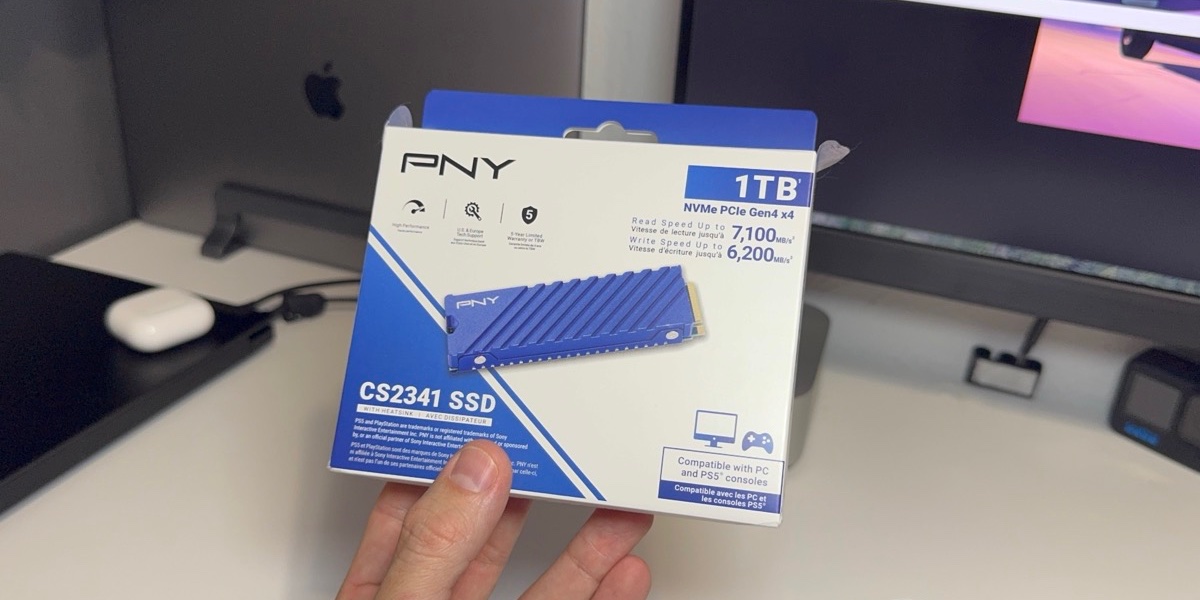
The PNY CS2341 is an M.2 2280 NVMe SSD that features a PCIe 4.0 x4 interface and advertised maximum speeds of up to 7.100 MB/s read and 6.200 MB/s write. These figures place it within the range of fast Gen4 drives, though without the race to squeeze every last megabyte per second out of it that we've seen in more expensive models. PNY seems to have aimed for a specific balance here: high performance, a standard form factor, and an integrated thermal solution that allows you to install the drive and forget about it. On paper, it's exactly the kind of SSD that makes sense for both a gaming PC and upgrading a console.
The 1 TB version also offers reasonable capacity for installing a good collection of games, although this is probably its biggest limitation. With titles that now routinely exceed 100 GB, 1 TB can disappear quite quickly. Technically, PNY uses 3D NAND flash memory and adds support for common technologies such as TRIM, SMART, and LDPC error correction. The manufacturer also mentions an MTBF of 1,5 million hours. I do miss, however, a bit more transparency regarding certain internal components and, especially, a clear endurance figure expressed in TBW, something that is always useful for comparing SSDs beyond their maximum speeds.
PS5 is clearly in the spotlight
Although PNY doesn't need to limit the CS2341 to a single console, a quick look at its specifications reveals that the PS5 has played a significant role in its design. Sony requires an M.2 NVMe PCIe Gen4 x4 drive and recommends sequential read speeds of at least 5.500 MB/s. The 7.100 MB/s advertised by PNY provides ample headroom. It also uses the M.2 2280 form factor, compatible with the console's expansion bay, so there's no need to worry about unusual dimensions or adapters. Essentially, it's a drive that, on paper, meets the requirements for expanding PS5 storage.
But there's an even more important detail than speed: the heatsink. Sony requires a cooling solution for the M.2 SSD, which makes buying some units a bit of a puzzle. You can buy an SSD without a heatsink and add one later, but then you have to check measurements and make sure everything fits correctly inside the console. The CS2341 eliminates that step entirely thanks to its factory-installed aluminum heatsink. It's a simple but incredibly practical decision. We're not just paying for high read speeds, but for an SSD that we can take out of the box and install almost as is in the PS5.
A heat sink that is more important than it seems
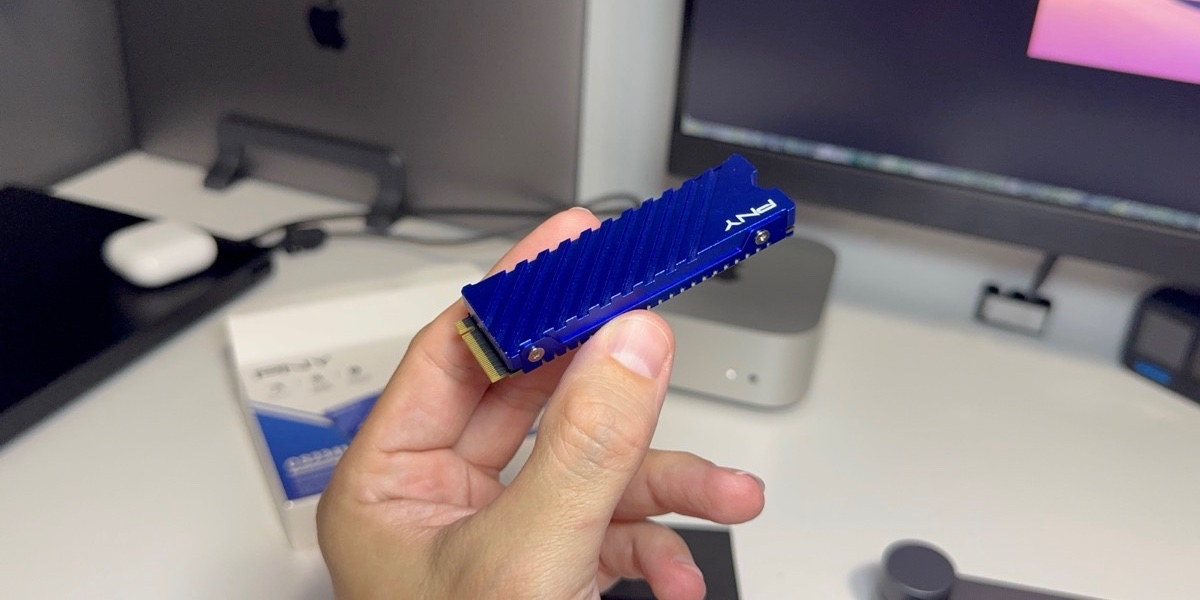
The blue heatsink is probably the most recognizable visual element of the PNY CS2341. It's made of aluminum and features a surface with different textures designed to increase the area available for heat dissipation. It 's not as exaggeratedly large as some PC heatsinks, nor does it try to be a decorative piece with RGB lighting. And that's a good thing, because dimensions matter here. The space allocated for the M.2 SSD inside the PS5 is limited, so an overly bulky cooling system would render all those impressive specifications practically useless for the console user.
I also find this a more interesting solution than selling the bare drive and leaving the heatsink to the buyer. PCIe 4.0 SSDs can generate a considerable amount of heat under sustained use, and keeping the controller within acceptable temperatures helps prevent performance losses caused by thermal throttling. In a PC, we have many more options for cooling an M.2 drive, from the motherboard's own heatsinks to good airflow. These options disappear in the PS5. Therefore, the CS2341's integrated heatsink isn't just an aesthetic addition: it's part of what makes this drive suitable for the console.
7.100 MB/s is more impressive on paper than in practice.
PNY announces sequential read speeds of up to 7.100 MB/s and sequential write speeds of up to 6.200 MB/s, figures high enough for the CS2341 to compete with high-end PCIe 4.0 SSDs. It's important to remember, however, that we're talking about maximum sequential speeds. This doesn't mean that every file will be copied at 7 GB/s or that all games will load proportionally faster than using a 5.500 or 6.000 MB/s drive. Real-world performance depends on the type of operation, file size, platform used, and other factors, making a synthetic benchmark and a game experience quite different.
This is especially evident on the PS5. Once you have an SSD fast enough to easily meet the console's requirements, increasing the sequential read speed doesn't necessarily produce noticeable differences on each loading screen. The appeal of the CS2341 lies precisely in having headroom. Its 7.100 MB/s means you're not buying a drive right at the edge of Sony's recommendations, but one that far exceeds them. You can install PS5 games directly onto it, run them from the SSD, and use it as a true extension of the internal storage, which is ultimately what really matters.
Installing it on PS5 takes just a few minutes
Installation is quite simple, even if you've never opened a PS5 before. First, completely power off the console, disconnect the cables, and remove the cover that provides access to the M.2 slot. Underneath, you'll find a small metal cover held in place by a screw. Removing this reveals the M.2 connector and the drive's locking mechanism. Since the CS2341 uses the 2280 form factor, you must position the small standoff on the console at the 80mm mark before inserting the SSD. Always hold it by the edges and avoid touching the contacts unnecessarily.
Next, simply insert the CS2341 at a slight angle into the M.2 connector, lower it until it rests on the spacer, and secure it with the screw. There's no need to install an additional heatsink: the PNY one already performs that function. Close the compartment cover again, replace the outer casing, and turn on the console. The PS5 will detect the drive and prompt you to format it before use. Once the process is complete, you can choose where to install your games and move titles between the internal SSD and the CS2341 from the storage settings. It's a much less intimidating upgrade than it seems before opening the console.
Its main enemy lies in price and capacity
The problem with the CS2341 isn't really its performance, but rather the sheer number of PCIe 4.0 SSDs that currently meet the PS5's requirements. Drives from Samsung, WD, Crucial, Kingston, Corsair, and other manufacturers offer similar speeds and, in many cases, versions specifically equipped with a heatsink. This makes price especially important. If the PNY is priced at the same level as or below equivalent alternatives, its 7.100 MB/s and included heatsink make for a very attractive package. If it's significantly more expensive, justifying the difference based solely on its top-end specifications becomes much harder.
I also would have appreciated a more ambitious focus on capacity. A 1TB SSD is still perfectly adequate for the PS5, but the size of current games makes 2TB a particularly attractive option for those who don't want to be constantly deleting and reinstalling titles. A handful of major releases can eat up a surprisingly large portion of the available terabyte. Therefore, before buying, I would consider not only the price of the CS2341 compared to other 1TB SSDs, but also the additional cost of upgrading to a good 2TB alternative. Sometimes the extra investment is worth far more than gaining a few hundred MB/s.
PNY CS2341: a particularly logical expansion for PS5
The PNY CS2341 doesn't try to reinvent the NVMe SSD, nor does it need to. Its appeal lies in its ability to combine virtually everything you'd want to upgrade a PS5 into a single product: M.2 2280 form factor, PCIe 4.0 x4 interface, read speeds up to 7.100 MB/s, and a pre-installed heatsink, eliminating the need for additional purchases. Installation takes only a few minutes, and once formatted, you can use it to directly install and run your PS5 games. It's precisely this "install and forget" capability that I find most attractive.
I wouldn't buy it, however, based solely on those 7.100 MB/s. At these speeds, the differences between good Gen4 SSDs are much more noticeable in certain benchmarks than during normal gameplay. The decision should be based on price and, above all, the capacity you need. If you're specifically looking for 1 TB for your PS5 and find the CS2341 at a competitive price (around €250) , I think it's a very easy option to recommend. If you have a huge game library, I'd probably look directly for the 2 TB option. The CS2341 has more than enough speed; the question is how much space you need to take advantage of it.
Table of Contents
